
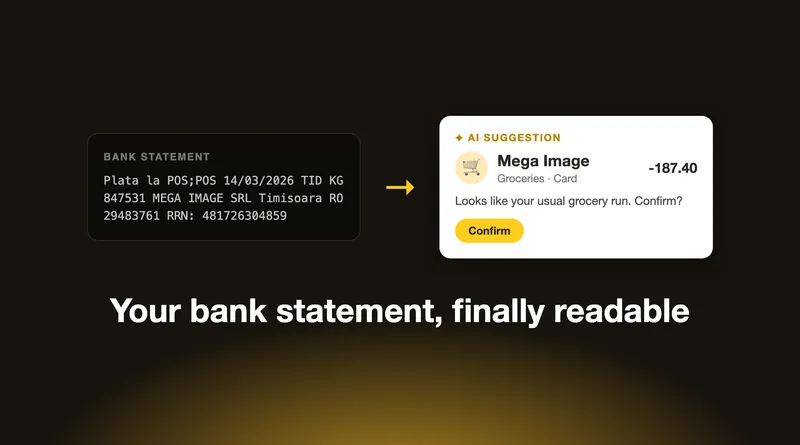
For most personal-finance apps, importing your bank transactions is supposed to be the easy part. You connect your bank, the app pulls in your statement, and… you’re handed a list of cryptic strings, each waiting for you to figure out which of your expenses it actually represents.
Plata la POS;POS 14/03/2026 TID KG847531 MEGA IMAGE SRL Timisoara RO
29483761 RRN: 481726304859 auth 761843920184736;TITULAR CONT;
REF: 023POSQ261430XK9
That’s a grocery run at Mega Image. You knew that. The app, until now, did not.
We just shipped a feature that changes this. Every imported bank row is greeted by a one-click suggestion: “Looks like this is the monthly Prime Video charge — confirm?” or “This matches the rent expense you entered yesterday — link them?” If the suggestion is right, you click once. If it’s wrong, you fix it. Either way, you’re never staring at a cryptic POS string again.
What makes this work isn’t the obvious “throw it at a chatbot” approach. It’s something more interesting, and we want to walk you through how it’s built — because the design choices matter, and they’re what makes the feature feel almost magical the longer you use it.
The problem nobody talks about
There’s a reason transaction matching is hard, and it’s not that the AI isn’t smart enough. It’s that two records of the same financial event almost never look alike.
When you swipe your card at a coffee shop, the bank records:
- Their settlement date (1–3 days later, not the day you actually bought the coffee).
- The merchant’s legal name —
STARBUCKS COFFEE COMPANY EU LIMITED, not “Starbucks”. - A terminal ID, a routing reference, an authorization token, a bank-internal sequence number.
- The amount in your account currency — even if you paid in a different currency on a trip abroad.
- Zero information about what category this is, what it was for, or whether you wanted to track it.
When you enter the same purchase by hand a week later, you write:
- “Coffee with Andrei” — the description that’s actually meaningful to you.
- The day you remember it happening, not the day it settled.
- Your own category (
#cafe, or#meetings, or#personal). - Maybe the original price you remember — say €4.50 — without thinking about exchange rates.
These two records are the same financial event. They have almost no overlapping data.
Multiply this across:
- Internal transfers — a single transfer between your own accounts shows up as two bank rows, on two different accounts, with opposite signs.
- Recurring subscriptions — your Prime Video monthly charge looks slightly different every month (different reference codes, occasionally different amounts), and you almost certainly didn’t pre-enter it.
- Bill payments — you might have a
Billrow in the app for your electricity, but the bank doesn’t say “this is your November electricity bill”. It saysEON ENERGIE 247.83 RON RRN: 605971817971. - Foreign exchange — bank charges in RON, but the merchant page shows the price in EUR, and you wrote down EUR.
- Loan repayments — same transfer mechanism, but it’s a loan payback, not a normal expense.
For all of this, the right interpretation lives in your history. The clue to what MEGA IMAGE SRL Timisoara is is the dozen other times you’ve already labeled charges from that merchant as #groceries. The clue to what a 2,000 RON transfer to “STANESCU LUCIA-MARIA” is is the eighty transfers you’ve made to that name over the past three years.
The boring approach that doesn’t work
The obvious solution is rules. “When the description contains MEGA IMAGE, suggest the Groceries category.” Easy.
It falls over almost immediately:
- Every user names their categories differently. Some have
#groceries. Some haveAlimentare. Some have a category calleddaily needsthat contains supermarket runs and gas station snacks. - Every bank formats descriptions differently. The same Mega Image charge looks different on BT, ING, Raiffeisen, Revolut.
- Merchants change names, get acquired, rebrand, expand into new categories.
- The rules grow and grow, and nobody maintains them.
The next obvious answer is “throw it at GPT-4” or any other large language model. Also problematic:
- Per-call costs add up — a few cents per scan, multiplied by every active user every day, becomes a real number quickly.
- Latency is high enough to feel sluggish at the scale of “a user just synced their bank, expects matches now”.
- More importantly: a generic model doesn’t know your conventions. It doesn’t know that you tag transfers to your spouse with
#shared. It doesn’t know your category names. It doesn’t know which transfers are to your own savings vs. family.
The right answer is somewhere in between: let the AI read your history and use it to interpret new bank rows, without ever leaking your data to anyone else’s account.
How it actually works — the clever bit
Here’s the design in one sentence: we use a small, cheap AI to turn every transaction (yours and the bank’s) into a mathematical fingerprint, then we find the fingerprints in your own history that look most like the new one, and we let those neighbours vote on what the new transaction is.
A few details worth understanding:
1. The fingerprints come from bank text, not your descriptions
This is the structural insight that makes the system work on real-world data.
When you confirmed an expense for “Prime Video” last month, you typed Prime Video subscription (or maybe just #video). The bank, however, recorded Plata la POS non-BT cu card MASTERCARD; ... Prime Video 1 Principal Place, Worship Str LONDON GB ....
If we tried to match a new bank row against your typed text, the fingerprints wouldn’t line up — Plata la POS … doesn’t look like Prime Video subscription to a similarity check. They’re the same idea, but the words are different.
So we do it the other way: we match the new bank row against the bank rows you’ve previously confirmed. Bank text against bank text. Plata la POS … Prime Video … against Plata la POS … Prime Video …. These do match, beautifully, because the noise is shared and the merchant identity sits in the same place every month.
When the system finds the match, it then borrows your typed description, your category, your destination account — because those are what you’ve already told the system you want.
In effect: the fingerprint is the bank’s text. The decision (category, kind, account) is your judgement. Each operating in the layer where it has the strongest signal.
2. Three things vote, not one
For every new bank row, three signals combine to produce a suggestion:
- Similarity — how much does the new bank description look like a past one you’ve already labeled?
- Amount and date proximity — is this within ±5% of the candidate’s amount and within 10 days of its date?
- Structural agreement — when fifteen past similar bank rows all turned into “create a recurring expense in category X with account Y”, that’s a strong signal the new one is the same pattern.
All three matter. Similarity alone breaks on first-time merchants. Amount/date alone produces false positives (two unrelated 47.83 RON debits on the same day). Structural agreement alone is empty for new categories. Together they give a confidence number we can act on.
3. The system gets smarter the longer you use it
This is the design’s real value proposition.
When you first turn the feature on, the system reads everything you’ve already done — every transaction you’ve ever manually confirmed, every category you’ve assigned, every transfer pair you’ve linked, every recurring template you’ve set up. That history immediately becomes the AI’s training set. Your training set.
The next month, when you confirm more transactions, those join the pool. Every “yes that’s right” you give the AI is an example it can use for the next suggestion. Every “no, change this category” is also a signal.
After a year of use:
- The system knows the names of everyone you regularly transfer money to.
- The system knows which merchants belong to which category — by your taxonomy, not anyone else’s.
- The system knows your recurring subscriptions and can suggest them even before the bank statement arrives at the usual date.
- The system knows that 4,000 RON transfers from your main account to your spouse’s account are a household-budget transfer with description “Transfer BT Pay” and category “Family”.
And critically: none of this happens for any other user. Each tenant’s data is segregated. Your patterns inform only your suggestions.
4. Auto-confirm for the obvious cases
Some matches are so clear-cut that asking the user to click is friction with no benefit. The 30th Prime Video charge of the year. The monthly rent transfer that you’ve confirmed without changes for twelve months running.
For those, there’s an optional auto-confirm setting. When a match crosses a confidence threshold (and you’ve explicitly opted in to auto-confirm), the system commits the link itself. The dashboard shows “AI auto-confirmed 5 transactions in your last sync” — and a one-click undo if anything’s wrong.
This is opt-in and rate-limited: it only kicks in for tenants who’ve already labeled enough transactions to have a real training set, and the confidence threshold is calibrated against historical decision data so the false-positive rate stays low.
What this means for you, the user
The practical experience changes in a few ways:
-
Sync-and-go. Connect your bank, hit sync, and the next time you look at the pending list, most of the rows have one-click confirmation cards next to them. The cards say things like “This looks like your monthly Vodafone bill — pay it from your main account?” or “This matches the transfer to your savings account from Tuesday — link them?”
-
The system learns from your edits. If you accept a suggestion but change the category, the AI sees that change. The next time a similar transaction shows up, it’ll suggest the category you actually want, not the one it originally guessed.
-
Cold-start is bridged by the old heuristic. Even before the AI has any training data — your very first day — the system still suggests matches by date/amount/account heuristics. The AI doesn’t replace those; it augments them once it has enough history to be reliable. You always have something to act on.
-
Recurring patterns become visible. The system can now recognise “this is the eighth time this charge has come in from this merchant, and you have a recurring template for it” — and propose paying the corresponding bill or escalating to a recurring expense template if you don’t have one yet.
-
Auto-confirm gives you the option to make it invisible for the patterns that are obvious to both you and the AI.
What we’re proud of, technically
Three details we think are worth highlighting:
It’s cheap and getting cheaper. A typical opted-in user costs well under €0.10 per month in AI infrastructure spend. Heavy users with long histories cost a fraction of a cent per sync after the one-time history-warmup. The economics scale.
It uses small models, not big ones. The embedding model (Amazon Titan Embed v2) and the cleanup/suggestion model (Amazon Nova Micro) are intentionally lightweight. We considered larger models — Claude Haiku, Nova Pro, Claude Sonnet — and benchmarked them. For this specific task, the small-model + clever-architecture approach beat large-model + dumb-architecture on accuracy and cost. Big-LLM dependency is a fallback, not the primary engine.
It respects user data sovereignty. Each tenant’s transaction history is the AI’s only training input for that tenant’s suggestions. We do not cross-train across users. We do not aggregate behavioural data. The model weights are AWS-managed (we use the off-the-shelf foundation models); the personalisation lives entirely in the embedding index we maintain per tenant.
What’s next
The feature is live for beta opt-in. Things on the roadmap:
- Cross-tenant rare-pattern detection — recognising “this transaction format means a fraud-monitoring fee” or similar bank-wide patterns, while keeping per-tenant data isolated.
- Smarter transfer-pair detection — automatically linking the debit-on-account-A and credit-on-account-B that are the two sides of one internal transfer, when both arrive in the same sync.
- Description quality improvements — currently we lean on Nova Micro to clean noisy bank descriptions; the regex-based cleaner is being expanded to handle more bank formats natively, dropping a layer of LLM calls.
- Calibration refits — using accept/reject signals to tune the matching coefficients automatically, so the system improves with the population’s behaviour without any manual model retraining.
But the core value proposition is already in place: the longer you use CashControl, the less work CashControl asks of you. Every transaction you confirm makes the next one easier. Every category you pick teaches the system your conventions. Every quirk of how you organise your money becomes a head-start the AI gets on your next bank sync.
That’s the bet, and that’s what we’ve built.